How can I update my subscription preference for the UNIQLO e-newsletter?
Our newsletter will keep you up-to-date with the latest launches, arrivals, exclusive promotions, and limited offers. To subscribe or unsubscribe, please follow the steps below:
STEP 1
On the Newsletter Subscription page here, please enter your email address.
STEP 2
Subscribe: Select the box and select 'SAVE' to subscribe from the e-newsletter.
Unsubscribe: Unselect the box and select 'SAVE' to unsubscribe from the e-newsletter.
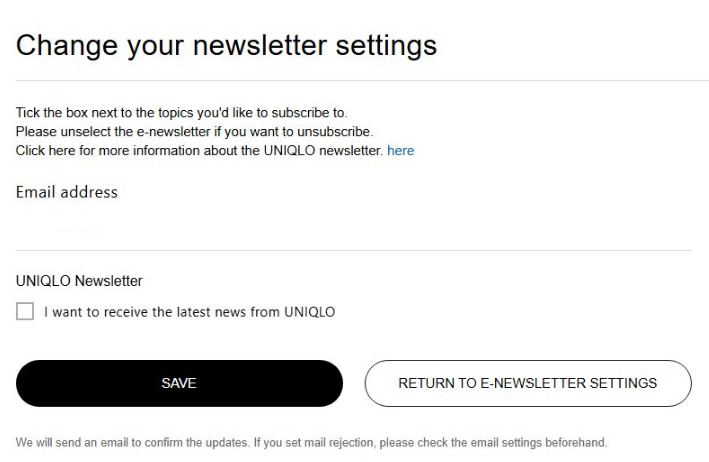
It can take up to 24 hours for your request to be completed. We do apologise if you receive an email from us within this period.
If you are still having any trouble, please contact our Customer Care team below via email, phone or chat to update your subscription preferences.
STEP 1
On the Newsletter Subscription page here, please enter your email address.
STEP 2
Subscribe: Select the box and select 'SAVE' to subscribe from the e-newsletter.
Unsubscribe: Unselect the box and select 'SAVE' to unsubscribe from the e-newsletter.
It can take up to 24 hours for your request to be completed. We do apologise if you receive an email from us within this period.
If you are still having any trouble, please contact our Customer Care team below via email, phone or chat to update your subscription preferences.
Contact UNIQLO Australia
 By Chat
Operating 10:00 AM - 5:00 PM AEST Mon to Sun
Reduced Hours: ANZAC Day - 1:00 PM to 5:00 PM AEST
Closed: Good Friday & Christmas Day
Reduced Hours: ANZAC Day - 1:00 PM to 5:00 PM AEST
Closed: Good Friday & Christmas Day
By Email
Our Customer Care team will get back to you within 1 business day.
For anything time critical please call us via the number below.
For anything time critical please call us via the number below.
By Phone
1800 864 756 (1800 UNIQLO)
Operating 9:00 AM - 5:00 PM AEST Mon to Sun
Reduced Hours: ANZAC Day - 1:00 PM to 5:00 PM AEST
Closed: Good Friday & Christmas Day
Reduced Hours: ANZAC Day - 1:00 PM to 5:00 PM AEST
Closed: Good Friday & Christmas Day